Showing posts with label Google Plus. Show all posts
Tuesday, March 6, 2012

Automatically Post Updates to Google+ from Twitter

0 comments
            Google+, the social networking site which was launched last July, is still not complete as there are no third party apps or tools to manage your account like Twitter and Facebook. Even though the API was made available by Google, it is not fully available to develop apps. You can cross post your Tweets to Facebook from Twitter, but no such service exists for Google+. We had covered few Google Chrome extensions like Publish sync, which does the job.

TwooglePlus is a new web app which can post your Twitter updates to Google+. TwooglePlus watches your Twitter account 24 hours a day and cross-posts your Tweets to your Google Plus circles. Its an online service, so no browser extensions or plugins to install.

Twoogleplus

You need to add both your Twitter account as well as Google+ account to the service and it monitors your Tweets and post them to Google+. TwooglePlus optionally unshortens links in your Tweets and you can cross-post from more than one Twitter account.

rss-2-twitter-via-twoogleplus

There are quite a few options available including selecting the circles and temporarily pausing the updates etc.

Note: One of main drawbacks of the site is that it asks for your Google username and password instead of oAuth. The developer has in fact explained the reason for such a move. Google+ API is read only, so you can only fetch the updates and not post updates, so in order to cross post, the service actually needs your user credentials. He also mentions that once the new API is made available, the service will be updated to oAuth. So it is up to the users to decide whether you want to provide the user credentials to a third party service.


Continue reading →
Wednesday, February 15, 2012

Google updates Google+ app for iOS, adds Instant Upload and More

0 comments
           The Google+ app for iOS has always been (understandably) behind the curve compared to its Android counterpart, with some of the features appearing a bit later. The latest feature to trickle down from the Android app is Instant Upload.

As some of you may know, Instant Upload uploads the pictures you take with the camera on your phone and uploads it to a private folder in your Google+ account. It’s actually a neat way to back up your images on an Android phone with with Photo Stream in iCloud, iOS users might not be in any real need of this feature.

The app now asks you whether you want to use your Wi-Fi network only or your 3G network to upload your images, or you can disable it altogether. The app needs to be running in the background to instantly upload the images as you capture them but it can also backup new images all at once every time you launch the app.


The other new feature is the inclusion of the What’s Hot stream and a new feature where you can just shake your iPhone to send feedback to Google. Finally, there are also some bug fixes and performance updates included in the latest version.

You can update the app through App Store on your iOS device or download it from here.

Continue reading →
Monday, November 7, 2011

Google+ Official Notifications Extension for Google Chrome

0 comments
                Google has been trying to give a push to the social networking tool with new features like private message. Now Google has released the official notification extension for Google Chrome. With the extension installed, you can view all the account notifications without having to open Google+.


You can click on the notification button available on the toolbar. The toolbar shows the count of unread notification available. Although this feature is available across all Google apps using the new Google toolbar, this is helpful only for people using Google Crome. Notifications include updates on who added you on Google+ and who added a comment or +1 to one of your posts or a post you commented on.


Clicking on any notification will show you the post just like the way it shows in Google+ and clicking on any link opens the post in Google+.


Continue reading →

Send a Direct Message in Google+

0 comments
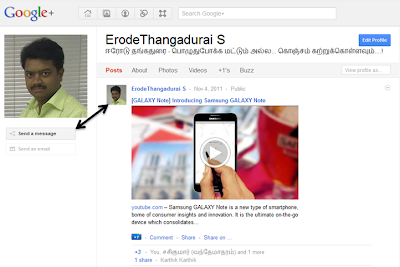
                Google has been constantly improving Google+ by adding more and more features. Recently we had written about Google+ creative kit tool which allows users to add filters and effects to your photos and do basic editing. Now Google+ has enabled the option to send a direct message to any person. Although this feature was previously available in the form of sending an update to one person, now it has moved to a position below the user profile.


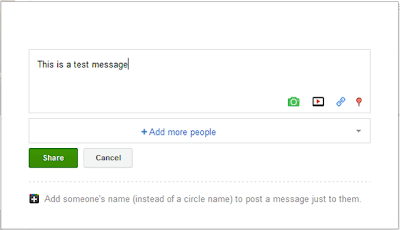
You can see a new button “Send a Message”available below profiles and clicking on them will open a pop up where you can share the update or message with the particular user.


This option does not add any new feature, but makes it easy to send a message to any person.

Continue reading →
Sunday, October 16, 2011

How to Remove Inactive Friends from Google+ Circle

0 comments
               Google+, the social networking service was well received by the audience, but it seems like there has been in a drop in the usage of Google+ in the past few days. When you created your account, you might have added lot of your friends to circles, but many of these friends might be inactive or signed up just for exploring Google+. If you have added large number of people to Google+. then it is difficult to spot who all are inactive (which means with very low posting or no posting). UnCircle+ is a nice extension for Google Chrome which allows you to easily search and remove inactive friends from your circle.


Once the extension is installed, it fetches the complete list of your friends whom you have added to your circles. You can also search for friends in any particular circle as well. In the next step the extension, you can select inactive friends, either based on no posts (default) or you can select posting since a date (date can be selected using the calendar).

Once the extension lists all your friends, you can select the ones which you want to remove and hit the Remove selected button.

This is useful for people who have reached their limit of maximum of 5000 people to circles. Nevertheless, not all of the people in your circles are active. Therefore, you end up having lots of inactive people in your circles which only count towards your quota. This extension is a perfect solution for this problem.


Continue reading →
Monday, September 26, 2011

Google+ Now Lets You “Share” Your Circles With Other Users

0 comments
                 In case you’re still using Google+ (I kid, I kid, the other social network is doing well, apparently), the Google+ team has made it easy to “share” your Circles with friends today, by enabling an option to send other users a list of Circle members on your Google+ Circles page.


Users who want to “share” the contents of their meticulously curated Circles can now click on the Share button as well as Edit and Delete in the Circles options menu and then select the Google+ user or users they want to share the Circle with.

The share function doesn’t reveal the name of the Circle (so the fact that you put your boss into “People I am not friends with” stays with you) and doesn’t reveal any changes you make to the Circle after sharing.

Users receiving the Circle can then make their own private edits after the fact, like adding you to “People I am not friends with” even.
Says Google Engineer Owen Prater,
“One of my favorite parts about circles is how they help me control who I share with, as well as what I read. In fact, many of you have created lots of great circles around topics that interest you (like Photographers) to bring lots of great content to your stream. In these cases, we’ve heard that you actually want to share your circles with others. Both to save your friends some time, and to connect them with interesting people and content.”
The update should be rolling out to everyone in the next couple of hours, according to Prater.
Continue reading →
Sunday, September 25, 2011

Google+ iOS App Updated With Added Hangout Support

0 comments
               Google has released a huge update to it’s Google+ app for iOS adding Hangout support allowing you to directly accessing Hangouts from your iOS device, Also the new update features sending photos in messenger, +1 on comments, sharing and more. This will be a bonus for Google+ in it’s race with Facebook.


Google+ Icon


The most noticeable feature of this new update is the Hangout which is basically a video chat room that allows any authenticated user from your circles to join you in a “Hangout” at anytime.

Google+ Features:

- Circles let you share the right things with just the right people
- Visit the stream to get updates from your circles or see what people are saying about things nearby
- Messenger is super-fast group messaging for everyone in your circles
- Mobile Hangouts allows you to video chat with up to 9 friends while you’re on the go

What’s New in Google+ Version 1.0.4.2326

* Join Hangouts from the mobile app
* Huddle is now Messenger
* Send photos in Messenger
* +1 on comments
* Reliability improvements in Messenger
* Granular push notification settings
* Map view in profile for places you’ve lived
* Improved +mention support
* Share a post with individuals
* Improved public search for people
* Various bug and performance improvements


Google+ App Screen Shots:


 Download Google+ iOS app from HERE
Continue reading →
Wednesday, September 21, 2011

Google+ - Now you sign up without invitation

0 comments
               Google+ has been around for about 3 months now but in field trial mode, which meant that you needed an invitation to join. But now it’s entered its beta stages and everyone can sing up for the social network project just by going to the web page of the service with no invitations required.


Google+ is still in toddler times and Google shares that there’s still a long way to go and much to accomplish, but the search giant hasn’t been wasting its time – there are now over 100 improvements and features.

Concerning mobile the iOS and Android (especially) mobile Google+ apps already have most of the prominent features of Google+. Hangouts is a video-conferencing feature of Google+ that’s already available on Android (Gingerbread required) and is coming soon to iOS.

Mentioning a Google+ member is easy and you can do it in a conversation with another person or a post just by doing a “+[name]” command. iOS users can now also +1 individual comments much like the “Like” function on Facebook – this functions will arrive for Android users soon.


The Google+ app can now also be moved on to the SD storage to spare phone memory for apps and other stuff. There’s also a customizable notifications option to select what you want to be notified about and what not.


On Android the “Huddle” feature has been renamed to “Messenger”, something that should also happen on iOS with the next app update.


Finally, Google+ now has opened its sign up. You no longer need an invitation to join Google+ – you can now just go to its webpage and get going. Signing up also works from the mobile apps. 

Continue reading →
Monday, September 5, 2011

Google does a “Fall Spring Clean” - its minor projects

0 comments
Google announced that it will be performing some optimization of its business, shutting down ten of its minor projects. The company says it’s done in order to streamline and simplify the user experience as most of these are already integrated in its other services.


Here comes the list, along with the reasoning, as provided by the Big G itself:

Here’s a quick overview of where a number of products and features are headed:

Aardvark:
Aardvark was a start-up we acquired in 2010. An experiment in a new kind of social search, it helped people answer each other’s questions. While Aardvark will be closing, we’ll continue to work on tools that enable people to connect and discover richer knowledge about the world.

Desktop:
In the last few years, there’s been a huge shift from local to cloud-based storage and computing, as well as the integration of search and gadget functionality into most modern operating systems. People now have instant access to their data, whether online or offline. As this was the goal of Google Desktop, the product will be discontinued on September 14, including all the associated APIs, services, plugins, gadgets and support.

Fast Flip:
Fast Flip was started to help pioneer news content browsing and reading experiences for the web and mobile devices. For the past two years, in collaboration with publishers, the Fast Flip experiment has fueled a new approach to faster, richer content display on the web. This approach will live on in our other display and delivery tools.

Google Maps API for Flash:
The Google Maps API for Flash was launched to provide ActionScript developers a way to integrate Google Maps into their applications. Although we’re deprecating the API, we’ll keep supporting existing Google Maps API Premier customers using the Google Maps API for Flash and we’ll focus our attention on the JavaScript Maps API v3 going forward.

Google Pack:
Due to the rapidly decreasing demand for downloadable software in favor of web apps, we will discontinue Google Pack today. People will still be able to access Google’s and our partners’ software quickly and easily through direct links on the Google Pack website.

Google Web Security:
Google Web Security came to Google as part of the Postini acquisition in 2007, and since then we’ve integrated much of the web security functionality directly into existing Google products, such as safe browsing in Chrome. Although our previous sales channel will be discontinued, we’ll continue to support our existing customers.

Image Labeler:
We began Google Image Labeler as a fun game to help people explore and label the images on the web. Although it will be discontinued, a wide variety of online games from Google are still available.

Notebook:
Google Notebook enabled people to combine clipped URLs from the web and free-form notes into documents they could share and publish. We’ll be shutting down Google Notebook in the coming months, but we’ll automatically export all notebook data to Google Docs.

Sidewiki:
Over the past few years, we’ve seen extraordinary innovation in terms of making the web collaborative. So we’ve decided to discontinue Sidewiki and focus instead on our broader social initiatives. Sidewiki authors will be given more details about this closure in the weeks ahead, and they’ll have a number of months to download their content.

Subscribed Links:
Subscribed Links enabled developers to create specialized search results that were added to the normal Google search results on relevant queries for subscribed users. Although we’ll be discontinuing Subscribed Links, developers will be able to access and download their data until September 15, at which point subscribed links will no longer appear in people’s search results.

There doesn’t seem to be any that will be missed too badly and, since it will hopefully free up some resources for more important projects, this appears to be a pretty good idea.

Is there something on the list that you were actually using, and that you are going to miss? Share your thoughts with TechNews in the comments section below.

Continue reading →
Monday, August 29, 2011

BACK UP YOUR GOOGLE+ DATA USING TAKEOUT

0 comments
Google+ is a new social network Launched by Google.But it is still in field trail mode,that is limited for only who has invitation they can join the network.Google+ has gained much support after launching last month, already 20 million users. You may have heard of Google's Data Liberation Front. The first product from this special ops unit is called Google Takeout and it's surprisingly effortless.
takeout
Here are the steps for liberating your data; also useful for backing up contacts and links you may have shared on the network.

1. Visit http://google.com/takeout
2. Click "Create Archive"
3. Download your files

The Google archive contains options for saving your Google Profile, Stream, Contacts and Circles, Picasa Albums, as well content from Buzz and +1 if you have these enabled.

In Takeout there is also another option to the users to download their data. You can also download the specific service like Picasa or Google plus data.

service-select-google

To download the specific service,you need to select the service and then you need to click the Create Archive button.Then Wait for seconds, Google will create your Archive file.Then you need to click the download button.After Clicking the download button,you need to enter your sign-in password for security concerns.Then Again you need to click the download button,your data safely will be downloaded to your hard drive.


Contacts are organized by the names you have given to your Circles and stored as .vcf cards. Picasa Web Albums are organized by Album Name or post date.
Whatever you have published to your Stream is archived as .HTML pages complete with images and comments. If you have reshared items, these pages are also part of the archive.
Continue reading →
Saturday, August 27, 2011

Google+ App updated for Android & iPhone Device

0 comments
Google+ app has been updated and now the app allows resharing the post.This feature was the one of the most requested one by many of the app users.In addition the app now supports 38 languages, which covers the whole international users.

Google+ changelog:


  • Reshare a post

  • App now available in 38 languages

  • Incremental improvements to notification reliability

  • Clearer Instant Upload options in the initial setup dialog

  • Ability to create a new circle from the "Circles" destination

Bug fixes:


  • Eliminate Instant Upload duplicates on HTC models

  • Fixed “No name” issue in Huddle

  • Hidden 1:1 Huddles now reappear when new messages are sent

  • Fixed issue with notifications count changing when switching from portrait to landscape

  • Other performance fixes and minor UI tweaks

  • Ability to create a new circle from the "Circles" destination


Download Google+ Android App
Continue reading →