Monday, November 14, 2011

Best Android Tablets Below Rs 15000 in India

0 comments
           Tablets are now getting more and more popular ever since the release of iPad. Although iPad is still by far the best selling tablet in the market, not all can afford it because of its high cost in India. For people who want to experience the power of tablets, they can opt for cheaper Android tablets.

         Android tablets are available in India as low as Rs 6000 and to the high end Samsung Tab. In this article we will mention the best Android tablets you can buy for less than Rs 15000 in India. Please note that when you go for a cheap Android tablet, obviously you will not get a good performance as Android is not the best when running on a smaller processor.The tablets are listed based on the prices with lowest to highest priced.
1. Beetel Magiq II:
Beetel Magiq II Android powered tablet comes with a 7-inch WVGA full touchscreen with a resolution of 800 x 480 pixels and 768 MHz Processor. It features Wi-Fi, 3G and 8 GB storage space. Magiq II runs on Android 2.2 (Froyo) and is priced around Rs 9500. The Tablets works on a Li-Ion 2200 mAh battery which has a standby time of up to 60 hours.

beetel-magiq-II
2. HCL ME Tablet X1:
HCL ME Tablet X1 runs on Android v2.3 (Gingerbread) Operating System and features a 7 inch LED Capacitive Multitouch Screen with Cortex A8 1 GHz Processor. It also packs a 2 MP Secondary camare, Wi-Fi and 3G Enabled and an expandable of 32 GB. This tablet is priced at Rs 10300/-

hcl-x1
3. Creative ZII07:
Creative ZII07 is powered by Android v2.2 (Froyo) and is powered by Creative’s proprietary ZiiLABS ZMS-08 HD Media-Rich Applications Processor and has 7 inch TFT LCD 480 x 800 pixels. It also feature WiFi and 8GB of internal storage. The downside of this tablet is that it does not support 3G, so you can use the tablet on the move. This tablet is priced at Rs. 11000.

creative-zii07
4. Reliance 3G Tab:
3G Tab from Reliance boasts of being one of the cheapest tablets available in the market running on the Android 2.3 (Gingerbread). You can select from a range of tariffs and plans available for the tablet. 3G Tab features a 800 MHz processor and 512 MB of RAM. The Reliance tablet sports a 7-inch multi-touch screen with a resolution of 800 x 480 pixels. This tablet from Reliance is adorned by a 2 megapixel rear camera and a front facing VGA camera. Reliance 3G tab is priced at Rs. 12999.

reliance-3g-tab
5. iBall Slide i7011:
iBall Slide i7011 runs on the Android v2.3 (Gingerbread) and powered by ARM Cortex-A8 Processor with 1 GHz processor speed. The Tablet comes with a DDR2 512 MB of RAM and has a 2 megapixels front-facing camera. The Tablet has a 7-inch full capacitive touchscreen with a resolution of 800 x 480 pixels. It also features 8 GB of internal memory space which can be extended up to 32 GB through microSD and microSDHC cards. The Slide works on a 4400 mAh Lithium-ion battery, giving you up to 6 hours of music and up to 5 hours of video playback time. The tablet is priced at Rs. 13995.

iball-i7011
6. Creative ZII10:
Creative ZII10 is designed mainly for entertainment and this tablet runs on Android v2.2 (Froyo) and has features that include synchronising the Tablet with various audio devices, giving you the ultimate music entertainment experience. The ZIIO is powered by Creatives proprietary ZiiLABS ZMS-08 HD Media-Rich Applications Processor, which is accompanied by 512MB RAM. It comes with a 10 inch touchscreen. The tablet is priced at Rs. 13900.

creative-zii10
7. ViewSonic ViewPad 7
ViewSonic ViewPad 7 is powered by Android v2.2 (Froyo) and runs on a 600 MHz ARM 11 Processor. It is loaded with a front-facing VGA camera and a rear-facing 3 megapixel camera. It also features a 7-inch full capacitive touchscreen with a high resolution of 800 x 400 pixels, along with a multi-touch panel. The tablet is priced at Rs. 14990.

viewpad7
Although there are many more Android tablets which are priced cheaply, they might not be the best in terms of user experience.

Continue reading →
Monday, November 7, 2011

Gmail Gets a New Look

0 comments
            Google has just announced that that Gmail will finally get the new look which was previewed few months back. The preview version was available as a theme, but now Google will roll out the new look across all accounts. There are many new features added to the new look including smarter navigation, conversation view and also new themes. If you what you get the new look click on the Switch to the new look in the bottom-right of Gmail. and this will be available in the coming days.

New Features available:

1. Better Conversation view: The conversation view was one feature available in Gmail for long time now and with the new design it has further improved. The new conversation view is much more simpler, readable and less cluttered.

conversationlarge

2. Customizable screen size: We all know that Gmail automatically changes the width and layout based on screen size, but with the new version you can select the screen size, if you want elements to be closer, you can choose the dense view.

customize

3. HD Themes: The themes section has been completely rebuild with new high resolution themes with imagery provided by iStockphoto.

4. Smarter Navigation: The sidebar elements are now resizable and can be set based on your preferences. For example, you can increase or decrease the height of chat box and labels available on Gmail.

searchlarge

5. Better Search: If you have large number of email, a very good search is required to find any email. Google has now improved the search which now allows you to select and enter the fields you want to search.

Continue reading →

Google+ Official Notifications Extension for Google Chrome

0 comments
                Google has been trying to give a push to the social networking tool with new features like private message. Now Google has released the official notification extension for Google Chrome. With the extension installed, you can view all the account notifications without having to open Google+.


You can click on the notification button available on the toolbar. The toolbar shows the count of unread notification available. Although this feature is available across all Google apps using the new Google toolbar, this is helpful only for people using Google Crome. Notifications include updates on who added you on Google+ and who added a comment or +1 to one of your posts or a post you commented on.


Clicking on any notification will show you the post just like the way it shows in Google+ and clicking on any link opens the post in Google+.


Continue reading →

Send a Direct Message in Google+

0 comments
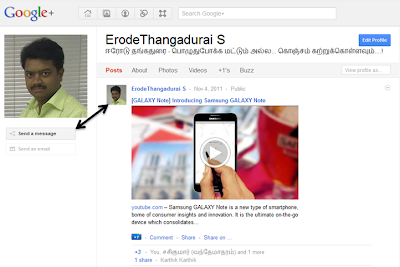
                Google has been constantly improving Google+ by adding more and more features. Recently we had written about Google+ creative kit tool which allows users to add filters and effects to your photos and do basic editing. Now Google+ has enabled the option to send a direct message to any person. Although this feature was previously available in the form of sending an update to one person, now it has moved to a position below the user profile.


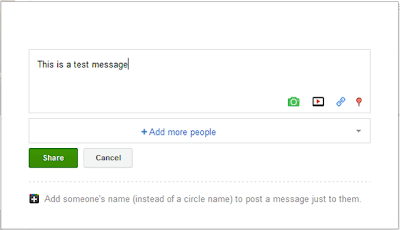
You can see a new button “Send a Message”available below profiles and clicking on them will open a pop up where you can share the update or message with the particular user.


This option does not add any new feature, but makes it easy to send a message to any person.

Continue reading →

Create a Free Website with Google India

3 comments
                        Google India has announced first-of-its kind program to offer free websites, domain & hosting services to small medium businesses in India. You can create a free website for your small business in few minutes with a free domain and hosting account. As per the program, you can get a free .IN domain name along with hosting from Hostgator. This is really great offer for SMBs which wants to get online and promote their products and services.


           SMBs interested in this offer can logon to www.indiagetonline.in and use the tool to get a free, easy-to-build website and web hosting for one year powered by HostGator. They also get a customized .IN domain name free of cost. The domain name and hosting account are free for one year and after that you need to pay for it.

What Indian businesses get from this offer:
  • It’s free to set up your website. The domain is free for 1 year, and it’s free to maintain your website for 12 months.
  • The website tool takes 15 minutes from sitting down to being found online
  • You don’t need to be a tech whiz to get started. All you need to start is your address, phone number, TAN/CIN or PAN to verify you as a business
  • The website is simple because customers are looking for simple information online
  • Gives you your own .in domain
  • Other features include photos/logos, integration with social media platforms
  • You get a Google Apps account – free personalised email ids
  • If you want to make your website work harder, you’ll have access to steady stream of free tips and tools from the Getting Indian Business Online team and a free coupon of worth Rs. 2500 INR advertising trial from Google AdWords to help promote your site.
  • After the first year, SMBs can choose to pay a monthly pay-as-you-go to maintain their website using HostGator.
  • At the end of the first year, they’ll have to pay a nominal charge if they wish to renew their domain name. They can cancel their website at any time.
Google India plans to help 500,000 small medium businesses in India to get online in next three years through this program, which is a great step for SMBs.

Continue reading →
Tuesday, November 1, 2011

Vodafone launches Mobile Application Store in India

2 comments
          
             Vodafone has launched Vodafone Mobile Application Store, Powered by Appia that has vast selection of over 10,000 free and paid applications for different mobile platforms such as Android, Java, Symbian and Blackberry. It shows Featured, Popular and New Apps. The popular App categories includes games, entertainment, social networking and local culture. There are also Apps from the local providers, including Hungama, India Games and Nazara, Spice, and Vodafone-branded apps like Portfolio Tracker, Vodafone TV, and Chhota Comics. You can also search for the apps manually.

Vodafone customers can sms <VStore> or <Apps> to 111 (toll-free) from their GPRS-enabled handsets and click on the URL in the response message to enter the app store. They can also log-in to live.vodafone.in from the mobile and click the Vstore link on the Vodafone Live homepage. Only the apps compatible with your device are shown and your handset model is automatically detected while you get to the app store via GPRS.


The store currently supports over 3,500 different devices that is optimized to match applications to the specific device. The applications are available in the range from free to Rs 20, while the games are priced up to Rs 150. It is available for Vodafone Prepaid & Postpaid Customers on both 2G / 3G.

Continue reading →

TRAI Raises SMS Limit To 200 SMS Per Day Per SIM

0 comments

         Now, there seems to be good news for all the SMS fans or Heavy SMS Users! Indian Telecom regulator Telecom Regulatory Authority of India (TRAI) today increased the limit of One hundred SMS (100 SMS) per day per SIM to Two hundred SMS (200 SMS) per day per SIM for prepaid users.

TRAI also doubles the SMS limits/caps for Postpaid mobile service users from 3000 SMS per month to 6000 SMS per month per SIM.

TRAI said that it has received representations from some of the service providers and consumers to increase the limit of 100 SMS per day per SIM. The Authority has considered these representations and decided to increase the limit of one hundred SMS per day per SIM to two hundred SMS per day per SIM.The new SMS cap of 200 SMSes per SIM per day for Prepaid and 6000 SMSes per SIM per month on Postpaid will be effective from today i.e. 1st November 2011.

New SMS Limits / Cap for Prepaid and Postpaid Subscribers :

Prepaid : 200 SMS Per Day Per SIM (existing 100 SMS/Day)

Postpaid : 6000 SMS Per Month Per SIM (existing 3000 SMS/Month)
Continue reading →

MTS Launches MTalky – Fixed Wireless Phone

1 comments

             MTS, CDMA Mobile service operator with over 13 million wireless customers today announced the market roll out of fixed wireless service dubbed as MTalky in India.

This latest roll out aims to provide “Home Phone” with unmatched coverage and voice clarity at affordable prices. MTS India’s MTalky Fixed Wireless phone (FWP) comes for Rs. 1200 offering a host of value-added benefits like freedom of mobility within the premises, high speed Internet access, in-built speaker, CLIP, missed call details, etc.


MTS has introduced a single rate plan which will be applicable to all potential ‘MTalky’ customers across its all circles. Customer can recharge of Rs. 495 and will get FREE 150 Minutes on net Daily valid up-to Jan 2037. The operator said that it will be a best option for any land line phone because if any subscriber recharge with annual recharge he/ she will get 100 talk time 1/2 paisa calling with 365 days tariff validity.

The launch of MTS ‘MTalky’ is backed by market research, which indicates that FWP has easily substituted the land line as the `shared’ family phone, creating more dependence, through personalization tools, which will help spur more use of the product within homes and enterprises segments.

Continue reading →

Best 10 Launcher Apps for Android

0 comments
            One of the best features when it comes to Android OS is the ability to customize almost every aspect of user interface (through apps) without having to do any rooting on your device. Launcher apps are pretty useful as you can load you favourite apps and settings and then quickly launch them from the main interface.

It is something similar to desktop shortcuts in Windows. There are many free and paid launcher apps available in Android Market with themes and customizations available. Here we are listing the top 12 and also the best launcher apps available for your Android phone. Please check the compatibility of the launcher app for yore phone before installing them.

This is one of the most popular launcher apps available for Android which is simple, powerful, fast and yet customizable. It has animated screen previews and shows up to 7 home screens based on your needs. Other features include the ability to customize icons (which can be downloaded from market) and also the feature to uninstall apps quickly from the home screen. The app also comes in a paid version with more features.
Launcher PRO Launcher PRO_1
GO Launcher Ex is the most popular home app in Android Market. It supports customizable home makeover, themes, smooth operation experience as well as various practical utilities. It brings you a fresh and extraordinary mobile operation experience. Another great feature of using this app is that there are 100s of free themes available based on this app and you download them free of cost.
Golauncher Ex Golauncher Ex_1
As the name indicates, this launcher get you the Windows Phone 7 UI on your Android phone. This app allows you to properly modify your start screen and also set the tiles as 2X1 or 2X2 based on your preferences. It comes with freely configurable tile colors and also original backgrounds from Windows Phone 7.
Launcher 7 Launcher 7_1
Regina 3D Launcher is a ‘Home Replacement Application’ which uses pure 3D graphics showing various dynamic 3D effects for your fun. Free version of Regina 3D Launcher will allow you to have 5 folders in total and 16 shortcuts in each folder. If you are a normal user with minimal apps installed, then these shortcuts are more than enough.
Regina 3D Launcher Regina 3D Launcher1
This is yet another popular home screen launchers for Android. ADW.Launcher is beyond tweaking your android desktop and is an open source home replacement app. It also features customizable drag & drop action buttons. There is also support for themes for this launcher. There is also a paid version of this app which comes with more features.
ADW launcher ADW launcher1
This is yet another free launcher for your Android phone, it comes with 5 screens where you can add your shortcuts. You can also quickly uninstall the app by drag and drop. It also features scrollable and re-sizable widgets.
HElauncher HElauncher_1
MX Home is an launcher application that is specialized in 3D effects. It provides totally different experiences by highlights from 3D effects and creative ideas. It has features which works on the sensors and movement of the phone. It is optimized for Android 2.1 or later and supports HVGA (320×480) WVGA (480×800) & QHD (540×960).
MX home Mx Home 1
91 PandaHome is a new Android home replacement app which is compatible with new features of Android 1.5 and higher. It features faster and smoother running, high number of theme resources, the strong functions, the most useful multi-screen/dockbar extensions and unique customization options available for the users.
Panda Home Panda Home1
Crazy Home Lite is a free home screen replacement with 3 separate desktops and up to 5 screens for each. It comes with full icon customization using the icon configurator and features the ability to hide apps from your app drawer.
Crazy Home Crazy Home_1

Paid Launcher Apps:

Most of the above listed launcher apps have their own PRO version or the paid apps with more features. Apart from this, there are other apps which have only paid version and does not come with a free version to try it out, listed below are such apps.
This is one launcher app which does not have a free version, but it comes packed with features like 3D effects. It comes with smart folders, collection of panels and widgets along with 3D widgets.
SPB shell SPB shell_1
There are many more launcher apps, but we have listed only the best ones. If you find an awesome launcher app for Android, please do list it in comments, we can include it in the list.

Continue reading →